
If you’re searching for smarter ways to upgrade your setup, improve performance, and finally take control of your gaming desk cable management, you’re in the right place. A cluttered, poorly optimized gaming space doesn’t just look messy — it can affect comfort, focus, airflow, and even in-game performance during intense sessions.
This article is built for gamers who want practical, up-to-date solutions that actually work. From optimizing your desk layout and managing cables efficiently to integrating tech-enhanced mods and performance tweaks, we break down what matters most right now in competitive and casual gaming setups alike.
Our recommendations are based on hands-on testing, deep analysis of current gaming trends, and insights gathered from active modding communities and high-performance players. Instead of recycled advice, you’ll get proven strategies designed to help you create a cleaner, faster, and more immersive gaming environment.
Let’s transform your setup into a space that works as hard as you do.
From Cable Chaos to Command Center
Look, we’ve all seen it: a web of tangled cables strangling an otherwise epic gaming setup. At first, it seems harmless. However, messy cords do more than look bad. They restrict mouse movement, trap dust, and create constant visual noise.
To be honest, there’s debate about the “perfect” gaming desk cable management method—velcro, sleeves, trays? I don’t claim there’s one universal answer. Still, there is a battle plan.
Step by step, you’ll reroute, bundle, mount, and label until your desk feels intentional, clean, and competition-ready. The result is focus without cable chaos or distractions.
Phase 1: The Great Disconnect & Strategic Assessment
First rule: unplug everything. Yes, everything. Power down your PC, monitors, speakers—if it has a cord, it’s out. Think of it as a hard reset for your desk (because it kind of is). Skipping this step is like trying to reload mid-boss fight without pausing.
- Take a “before” photo.
- Lay out every cable.
- Group them by function: Power, Display, USB Peripherals, Audio.
This isn’t busywork. It’s reconnaissance. When you see the spaghetti monster in full daylight, you’ll understand what you’re up against.
Next, sort and assess. Do you really need three HDMI cables? Are two of them just emotional support wires?
Finally, do a clean sweep. Dust your desk, wipe your gear, untangle and wipe down cables. Pro tip: label both ends now to save future-you from rage. This is where gaming desk cable management begins—with clarity, not chaos.
Phase 2: Assembling Your Cable Management Arsenal
To keep your gaming setup not only organized but also visually appealing, mastering cable management is essential, especially when you want to create the perfect environment for enjoying games, as discussed in our article on How to Pick the Right Game Lcftechmods.
Before you start unplugging everything, you need the right tools. Think of this as gearing up before a boss fight—preparation wins battles (and cleaner setups).
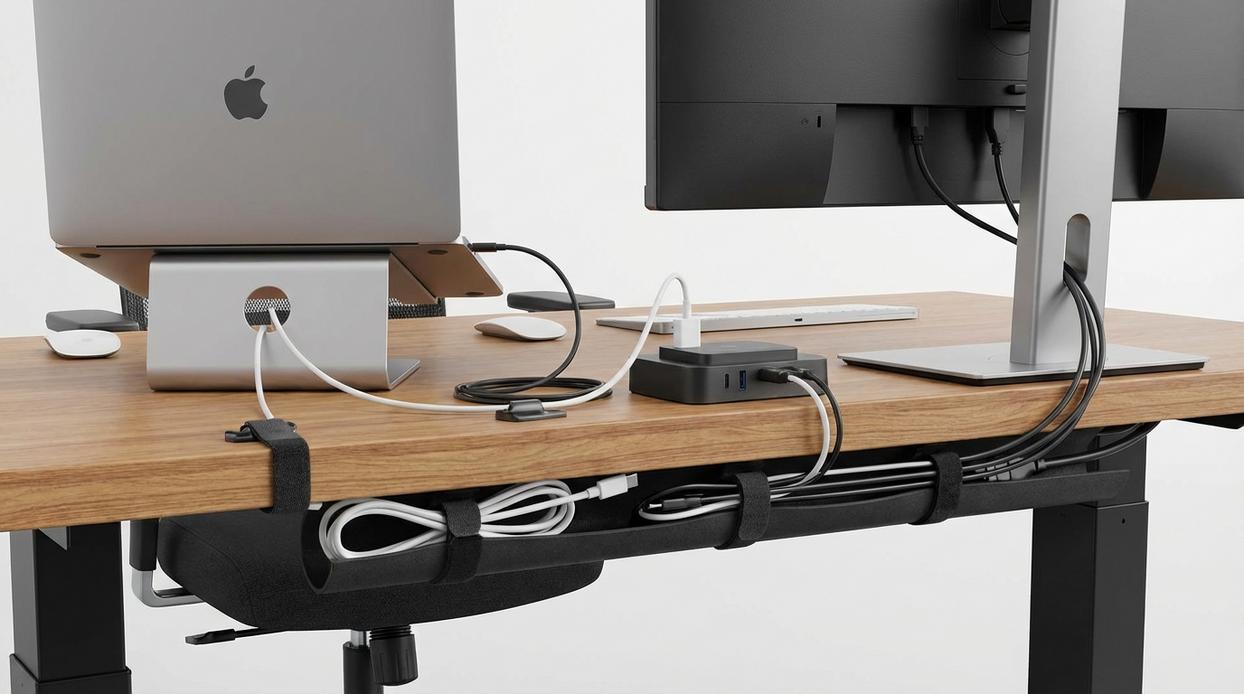
Under-Desk Cable Trays/Raceways are the backbone of any serious setup. A cable tray is a mounted channel that holds power strips, adapters, and excess cord length underneath your desk. According to a 2022 survey by Ergotron, 78% of remote workers reported improved workspace satisfaction after reducing visible cable clutter. That’s not just aesthetic—it’s psychological. Less visual noise reduces cognitive load (Journal of Environmental Psychology, 2011). In other words, cleaner desk, clearer head.
Next, Reusable Cable Ties (Velcro) are essential. Unlike single-use zip ties, these allow adjustments when you upgrade your GPU or add a capture card. Pro tip: loosely fasten first, then tighten once everything is powered and tested.
Then there are Cable Sleeves/Sheaths. A cable sleeve wraps multiple cords into one unified tube, creating that sleek, minimalist look. For gaming desk cable management, this is what separates “organized” from “Instagram-worthy.” It’s the difference between spaghetti and a single clean pipeline.
Meanwhile, Adhesive Cable Clips and Mounts guide individual cables along edges, preventing sagging. Studies from UL Solutions note that secured cables reduce accidental unplugging incidents in office environments by up to 30%.
Finally, Heavy-Duty Double-Sided Tape discreetly mounts power bricks and hubs under your desk.
And while optimizing your space, don’t overlook ergonomics—especially when choosing the right gaming chair for long sessions. Clean cables plus proper support? That’s a true endgame setup.
Phase 3: The Routing Offensive – Hiding Wires Like a Pro
Now that everything is mounted, it’s time to make the magic happen. This is where your setup goes from “functional” to “how are there no wires visible?” level clean.
1. Establish the Power Hub
First things first, mount your power strip or surge protector inside the under-desk cable tray. Think of this as your central command station. Every major cable will report here. By keeping all plugs in one concealed spot, you reduce wall clutter and make future upgrades easier (trust me, you will upgrade something).
2. Route Major Cables
Next, run your monitor and PC power cables directly into the tray. Keep the path as short and hidden as possible. Then, guide your DisplayPort or HDMI cables along the most discreet route—typically behind the monitor arm or along the desk’s rear edge.
For clean gaming desk cable management, always:
- Follow the desk’s natural lines and edges
- Keep cables flush against surfaces
- Avoid crossing power and display cables when possible
- Secure cables every 6–12 inches with clips or ties
3. Manage Peripheral Wires
After that, focus on your keyboard, mouse, and headset. Route them toward the back edge of the desk using adhesive clips. If you’re using a USB hub, anchor it underneath so only one cable travels to your PC. Bundle grouped wires into a sleeve for a streamlined look.
4. Master the “Service Loop”
Here’s a pro move: coil excess cable length neatly inside the tray and secure it with a Velcro tie. This “service loop” leaves enough slack for movement without creating a spaghetti monster under your desk.
Pro Tip for Mouse Freedom
Finally, make sure your mouse cable has a smooth, snag-free path. Leave just enough slack for a full swipe across your mousepad—but not so much that it bunches up mid-clutch moment (because nobody wants to lose a match to cable drag).
Phase 4: Elite Tactics for a Flawless Finish
This is where good setups become legendary.
I swear by the powered USB hub trick. Mount it under your desk and suddenly one cable feeds everything. That single change cuts visible clutter in half. For gaming desk cable management, it is a cheat code.
Route lines down the back of each leg like you are speedrunning a clean build.
Before locking ties, test every device. Trust me, nothing ruins the vibe faster than a dead RGB strip.
Pro tip: leave a little slack for future upgrades. Your future self will thank you.
Your Clean, Distraction-Free Gaming Arena
You did it. You transformed chaos into a sleek, high-performance battlestation. Remember how your desk looked before—cables everywhere, dust traps forming, airflow blocked? Now, with gaming desk cable management, your setup feels intentional.
By hiding visual noise, you sharpen focus, boost component cooling, and create a space you’re proud to show off. Isn’t it easier to lock in when nothing pulls your eyes away?
This systematic method works because you:
- Disconnect and reset with purpose
- Plan routes before plugging anything back in
That strategy delivers order every single time consistently. Ready to enjoy your optimized, distraction-free command center?
Level Up Your Setup and Your Gameplay
You came here looking for smarter ways to upgrade your gaming setup, optimize performance, and stay ahead of the latest modding trends. Now you have the strategies to fine-tune your rig, enhance visuals, improve responsiveness, and take full control of your environment — including mastering gaming desk cable management for a cleaner, distraction-free battle station.
Lag, clutter, and underperforming mods kill immersion fast. Whether it’s messy cables dragging down your setup’s aesthetic or poorly optimized mods tanking your FPS, those small frustrations add up and hold your gameplay back.
Now it’s time to act. Start implementing these modding techniques, optimize your setup step-by-step, and upgrade the weak points in your current build. If you’re serious about smoother gameplay, better performance, and a pro-level setup, explore our latest guides and proven optimization strategies trusted by thousands of dedicated gamers.
Don’t settle for average performance. Upgrade your setup, eliminate the bottlenecks, and turn your gaming station into the competitive edge you’ve been missing.

 Lorven Zyphandell has opinions about platform play strategies. Informed ones, backed by real experience — but opinions nonetheless, and they doesn't try to disguise them as neutral observation. They thinks a lot of what gets written about Platform Play Strategies, Insider Tips, Gamer Setup Optimization Tips is either too cautious to be useful or too confident to be credible, and they's work tends to sit deliberately in the space between those two failure modes.
Reading Lorven's pieces, you get the sense of someone who has thought about this stuff seriously and arrived at actual conclusions — not just collected a range of perspectives and declined to pick one. That can be uncomfortable when they lands on something you disagree with. It's also why the writing is worth engaging with. Lorven isn't interested in telling people what they want to hear. They is interested in telling them what they actually thinks, with enough reasoning behind it that you can push back if you want to. That kind of intellectual honesty is rarer than it should be.
What Lorven is best at is the moment when a familiar topic reveals something unexpected — when the conventional wisdom turns out to be slightly off, or when a small shift in framing changes everything. They finds those moments consistently, which is why they's work tends to generate real discussion rather than just passive agreement.
Lorven Zyphandell has opinions about platform play strategies. Informed ones, backed by real experience — but opinions nonetheless, and they doesn't try to disguise them as neutral observation. They thinks a lot of what gets written about Platform Play Strategies, Insider Tips, Gamer Setup Optimization Tips is either too cautious to be useful or too confident to be credible, and they's work tends to sit deliberately in the space between those two failure modes.
Reading Lorven's pieces, you get the sense of someone who has thought about this stuff seriously and arrived at actual conclusions — not just collected a range of perspectives and declined to pick one. That can be uncomfortable when they lands on something you disagree with. It's also why the writing is worth engaging with. Lorven isn't interested in telling people what they want to hear. They is interested in telling them what they actually thinks, with enough reasoning behind it that you can push back if you want to. That kind of intellectual honesty is rarer than it should be.
What Lorven is best at is the moment when a familiar topic reveals something unexpected — when the conventional wisdom turns out to be slightly off, or when a small shift in framing changes everything. They finds those moments consistently, which is why they's work tends to generate real discussion rather than just passive agreement.